
In Bengaluru traffic and my daily work routine, managing my 'The Rhythm & Reason' website is a big challenge. To save the time and boost my creativity, I rely on several tech tools every day in life. Here is a list of the best AI apps that finish editing in seconds and lighten my workload. These aren't just apps; they are the co-workers of my digital journey! If give one more word for this is My Friends and I use all app last 2 to 3 years
The creative process has always been a delicate dance between inspiration and execution. Every content creator, whether a seasoned filmmaker, a digital artist, or a weekend blogger, knows the feeling of being struck by a brilliant idea, only to be bogged down by the tedious, repetitive tasks required to bring that idea to life. Hours spent cutting out backgrounds, transcribing interviews, color grading footage, or hunting for the perfect B-roll can drain the joy right out of the creative rhythm.
But we are living in the midst of a technological renaissance. Artificial Intelligence (AI) is no longer a futuristic concept confined to science fiction; it is here, right on our mobile devices and desktops, acting as the ultimate creative co-pilot. The goal of AI in the creative space is not to replace the artist, but to remove the friction from the artistic process. It exists to handle the mundane so you can focus on the masterpiece.
In this comprehensive guide, we will explore the top AI editing apps across video, photography, audio, and written content. Whether you manage your entire production on a smartphone or work from a high-end desktop, these tools are designed to harmonize your creative flow and let you edit with unprecedented ease.
1. The Evolution of Editing: From Manual Labor to AI Magic
To truly appreciate the current landscape of AI tools, we must look at how far we have come. Just a decade ago, removing a subject from a video background (rotoscoping) required going frame by frame—a process that could take days for just a few seconds of footage. Audio cleanup required expensive soundproof studios and highly complex equalizer adjustments.
Today, machine learning algorithms and neural networks have been trained on millions of data points, allowing them to understand context, isolate subjects, generate missing pixels, and even construct entire environments from simple text prompts. This shift has democratized content creation. High-end production value is no longer restricted to Hollywood studios with massive budgets; it is available to anyone with an internet connection and a vision.
Let us break down the top AI editing apps by category, exploring how they can supercharge your specific creative workflow.
2. The Visual Symphony: Top AI Apps for Video Editing
Video is arguably the most engaging medium on the internet today, but it is also the most time-consuming to edit. These AI-powered video editors are changing the game.
A. CapCut: The Mobile Creator’s Powerhouse
For creators who shoot, edit, and publish entirely from their mobile devices, CapCut has become the undisputed king. Originally popularized by the TikTok generation, CapCut is packed with incredibly powerful AI features that fit right in your pocket.
• Auto-Captions: It uses advanced speech recognition to generate highly accurate subtitles in seconds, a crucial feature for modern social media where most videos are watched on mute.
• AI Background Removal: You can remove video backgrounds flawlessly without needing a green screen.
• Auto-Velocity and Tracking: The app’s AI can automatically sync your video cuts to the beat of a background track, ensuring your edits always hit the perfect rhythm.
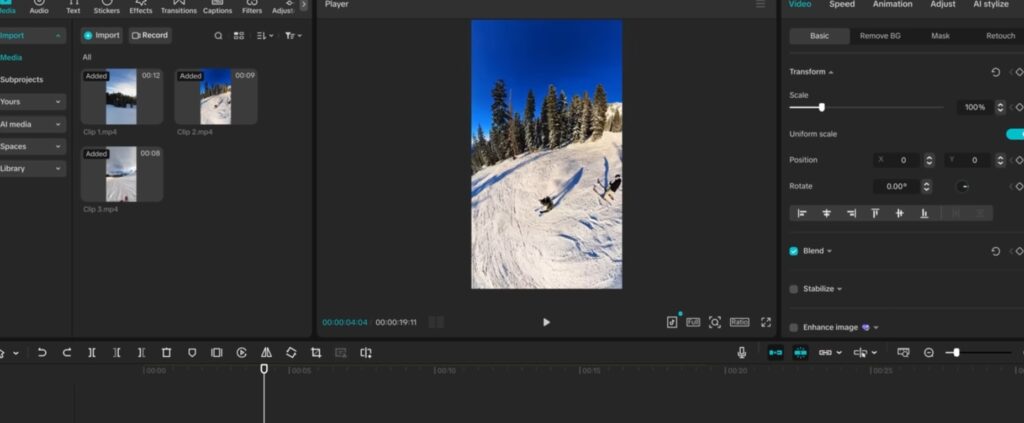
in this image, you can see that CapCut editing software in PC. It’s good for every thing in local language, all in one in one website that is CapCut. And it’s easy to use it will give you best effect other apps. This year update is very very good. Try once and I am using for video editing last three years. It’s made me feel happy and it’s quick. Also there is one more benefit of it. It’s not give any ads.
B. Descript: Editing Video Like a Text Document
Descript completely flips the traditional video editing paradigm on its head. Instead of staring at a complex, multi-track timeline, Descript transcribes your video into text.
• Text-Based Editing: To cut a scene or remove a filler word (like “um” or “uh”), you simply delete the text in the transcript, and the video edit is made automatically.
• Overdub: If you misspoke during a recording, Descript’s AI allows you to type the correct word, and it generates your exact voice to fix the audio, saving you the hassle of re-recording.
C. Runway (Gen-2): The Frontier of Generative AI
RunwayML is for creators pushing the boundaries of visual storytelling. It is a web-based suite of “AI Magic Tools” that feel like they belong in the future.
• Text-to-Video: With Gen-2, you can type a descriptive prompt, and the AI will generate entirely new, high-fidelity video clips from scratch.
• Inpainting: Want to remove an unwanted object from a moving video? Simply brush over it, and the AI seamlessly removes it and fills in the background, matching the lighting and motion.
D. Adobe Premiere Pro (powered by Adobe Sensei)
For professional desktop editors, Adobe has integrated its Sensei AI directly into Premiere Pro. Features like Auto Reframe intelligently identify the focal point of your video and automatically crop it for different aspect ratios (like moving from YouTube widescreen to Instagram Reels vertical), saving hours of manual keyframing.
3. The Perfect Frame: Top AI Apps for Photo & Image Design
Whether you are designing a blog thumbnail, a website banner, or a social media post, AI has made photo manipulation astonishingly simple.
A. Canva (Magic Studio): The Ultimate Design Companion
Canva has revolutionized graphic design by making it accessible, and their newly introduced Magic Studio is a massive leap forward. Managing layouts and producing highly visual content is incredibly fast with these features:
• Magic Expand & Magic Grab: If a photo is too small for your layout, Magic Expand uses AI to generate what lies outside the frame. Magic Grab allows you to pick up any subject in a flat image and move it around as if it were a separate layer.
• Magic Media: This text-to-image and text-to-video generator allows you to create custom assets directly within your workspace, meaning you no longer have to rely exclusively on generic stock photos.
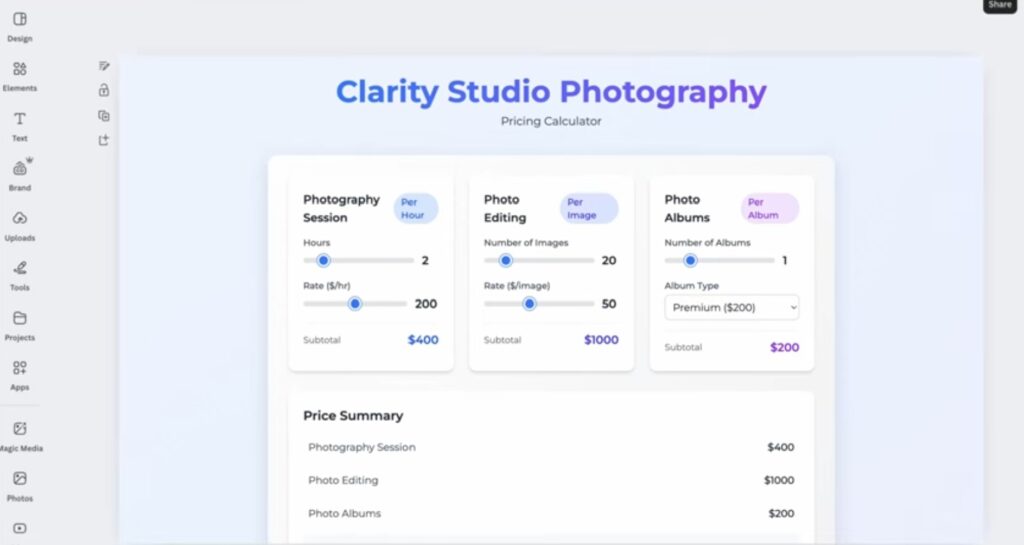
In that image u already know it’s canva I’m using for photos,video and generate QR code done by here in this app, you will get many design for your photos and you can also manage website here only, but it’s pro.
B. Adobe Photoshop (Generative Fill)
Powered by the Adobe Firefly AI model, the Generative Fill feature in Photoshop is arguably the most powerful image editing tool currently available. By selecting an area and typing a prompt, you can add, remove, or expand elements within an image. The AI perfectly matches the lighting, perspective, and depth of field of the original photograph, making the edits completely undetectable.
C. Luminar Neo
For photographers looking to enhance their raw images without getting bogged down in complex Photoshop layers, Luminar Neo is the perfect solution. Its AI automatically detects skies, allowing for instant, hyper-realistic sky replacements. It also features Portrait Bokeh AI, which perfectly blurs the background behind a subject, mimicking the look of expensive, wide-aperture camera lenses.
4. The Perfect Pitch: Top AI Apps for Audio & Music
Bad audio will ruin a great video faster than bad video quality. Fortunately, AI has made professional-grade audio accessible to everyone.
A. Adobe Podcast AI (Enhance Speech)
This is a magical, free web-based tool. If you record a voiceover in a noisy room, a coffee shop, or near a busy street with an inferior microphone, Adobe Podcast AI analyzes the file and strips away all background noise and echo. The result sounds as if it were recorded in a professional, sound-treated studio using a premium microphone.
B. Suno AI & Udio: Generative Music for Creators
Finding royalty-free music that perfectly matches the emotional tone of your content is a massive headache. Platforms like Suno AI and Udio allow you to generate completely original, high-fidelity music tracks simply by typing a prompt. You can dictate the genre, tempo, and mood, creating custom soundtracks that perfectly align with your creative rhythm.
C. ElevenLabs: The Pinnacle of Voice Synthesis
If you need a voiceover but do not want to record it yourself, ElevenLabs offers the most realistic text-to-speech AI in the world. The AI captures human emotion, breathing patterns, and intonation perfectly. It is highly useful for creators producing faceless channels, automated news summaries, or translating their content into different languages with native-sounding dubbing.
5. The Written Word: Top AI Apps for Text & Copy Editing
Behind every great video, website, or podcast is a well-written script or outline. AI helps structure your thoughts and ensures your writing is impactful.
A. Perplexity Pro: The Ultimate Research Engine
For creators who build information-dense content, like biographies, financial analysis, or deep-dive technology reviews, getting the facts right is crucial. Perplexity Pro acts as a conversational search engine that deeply analyzes real-time web data to provide accurate, well-cited answers. It helps creators structure their research, break down complex topics, and build the factual backbone of their articles before they even start writing.
B. GrammarlyGO
Beyond just fixing spelling and comma splices, Grammarly’s generative AI assists in adjusting the tone of your writing. Whether you need an email to sound more professional, a blog intro to be more engaging, or a paragraph to be more concise, GrammarlyGO rewrites and refines your text on the fly.
C. Notion AI
For creators managing their editorial calendars and drafting content in Notion, the integrated AI is a game-changer. It can summarize long meeting notes, brainstorm blog titles, generate article outlines, and rewrite clumsy paragraphs directly within your workspace, keeping you completely immersed in your creative flow.
6. How to Build Your AI Creative Tech Stack
With so many top AI editing apps available, it is easy to get overwhelmed by “tool fatigue.” The key is not to use every single AI app on the market, but to build a personalized “Tech Stack” that specifically addresses your bottlenecks.
Step 1: Identify Your Friction Points
Look at your creative process. What takes the most time? If transcribing interviews is your biggest headache, invest your time in Descript. If finding the right layout and images is slowing you down, lean heavily into Canva’s Magic Studio.
Step 2: Consider Your Hardware
If you rely heavily on mobile devices for your administrative and creative tasks, web-based tools and mobile-optimized apps like CapCut and Canva are essential. If you have a powerful desktop, local software like Premiere Pro or DaVinci Resolve (which also features incredible AI masking tools) might be a better fit.
Step 3: Budget and Subscriptions
Many of these tools require monthly subscriptions. Assess your budget. Tools that offer multiple AI functionalities under one roof (like Google One’s AI tier for storage and drafting, or a comprehensive design suite) often provide better value than subscribing to five different niche applications.
7. The Future of AI in the Creative Rhythm
We are merely at the beginning of the AI creative revolution. In the coming years, we will see these disparate tools merge into unified ecosystems. Imagine a workflow where a single prompt generates a written script, synthesizes the voiceover, creates the relevant video assets, edits them together to the beat of an AI-generated soundtrack, and optimizes the final output for every social media platform simultaneously.
However, amidst all this automation, one truth remains absolute: AI cannot replace human perspective, emotion, and lived experience. An AI can generate a flawless image of a sunset, but it cannot understand the profound emotional impact of watching that sunset after a long, hard day of work. The soul of the art always comes from the creator.
My Conclusion
Vishal’s Takeaway:
I Watching the landscape of digital creation change has been incredible, but for me, the real value of these top AI editing apps comes down to one thing: buying back my most valuable asset—time. Between navigating my daily routine in Bengaluru and building The Rhythm & Reason, delegating repetitive, it’s time-consuming tasks to artificial intelligence gives me the time to actually think, experiment, and my dream.
Whether you are editing a fast-paced vlog on a mobile app or pc, designing a stunning website layout, or composing a detailed historical biography like I often do, the goal is to harmonize your workflow.
My advice? Embrace these tools not as replacements for it own voice, but as powerful instruments in your creative orchestra. When you let AI help you edit with ease, your true ‘rhythm’ and ‘reason’ can finally shine through.
Frequently Asked Questions (FAQs) by people is there check it once
Q1: Will AI editing apps eventually replace human video and photo editors?
A: No, AI is a tool, not an artist. While AI will replace tedious manual tasks (like background removal or basic transcription), the creative decisions, storytelling, and emotional pacing will always require human intuition and human taste.
Q2: Which is the best AI video editing app for mobile users?
A: CapCut is currently the most powerful and accessible mobile video editor. Its built-in AI features for auto-captions, background removal, and beat-syncing make it ideal for creators producing content directly from their smartphones.
Q3: Are the images and music generated by AI copyright-free?
A: The legal landscape is still evolving. Generally, assets generated using paid tiers of platforms like Adobe Firefly, Canva Magic Studio, or Suno AI grant you commercial rights to use the output. However, you cannot traditionally “copyright” an entirely AI-generated image as your own original work in most jurisdictions.
Q4: How can AI help with writing and research for blogs?
A: Tools like Perplexity Pro are excellent for conducting deep, real-time research with citations. Generative AI tools integrated into workspaces like Notion or Grammarly help outline articles, overcome writer’s block, and refine the tone and grammar of the final draft.
Q5: Is it expensive to use AI editing tools?
A: Not necessarily. Many powerful AI tools (like CapCut or Adobe Podcast Enhance) offer robust free versions. For more advanced generative capabilities, premium subscriptions are required, but their cost is often offset by the massive amount of time they save the creator.
Recommended Reading from The Rhythm & Reason: Looking for inspiration to stay strong during tough times? Read theLife and Legacy of Swami Vivekananda.